Week 05 | Day 04
Force Control and Impedance Control: Interacting with the World
Published: April 23, 2026 | Author: Smartotics Learning Journey | Reading Time: 14 min
TL;DR: Position control works in free space, but real robots touch things. Force control regulates contact forces directly. Impedance control shapes the robot’s dynamic relationship between position and force — making it behave like a mass-spring-damper system that adapts to its environment.
Why Position Control Fails at Contact
We’ve spent weeks on position control: “Go to point A, then point B.” This works beautifully in empty space. But what happens when the robot hits something?
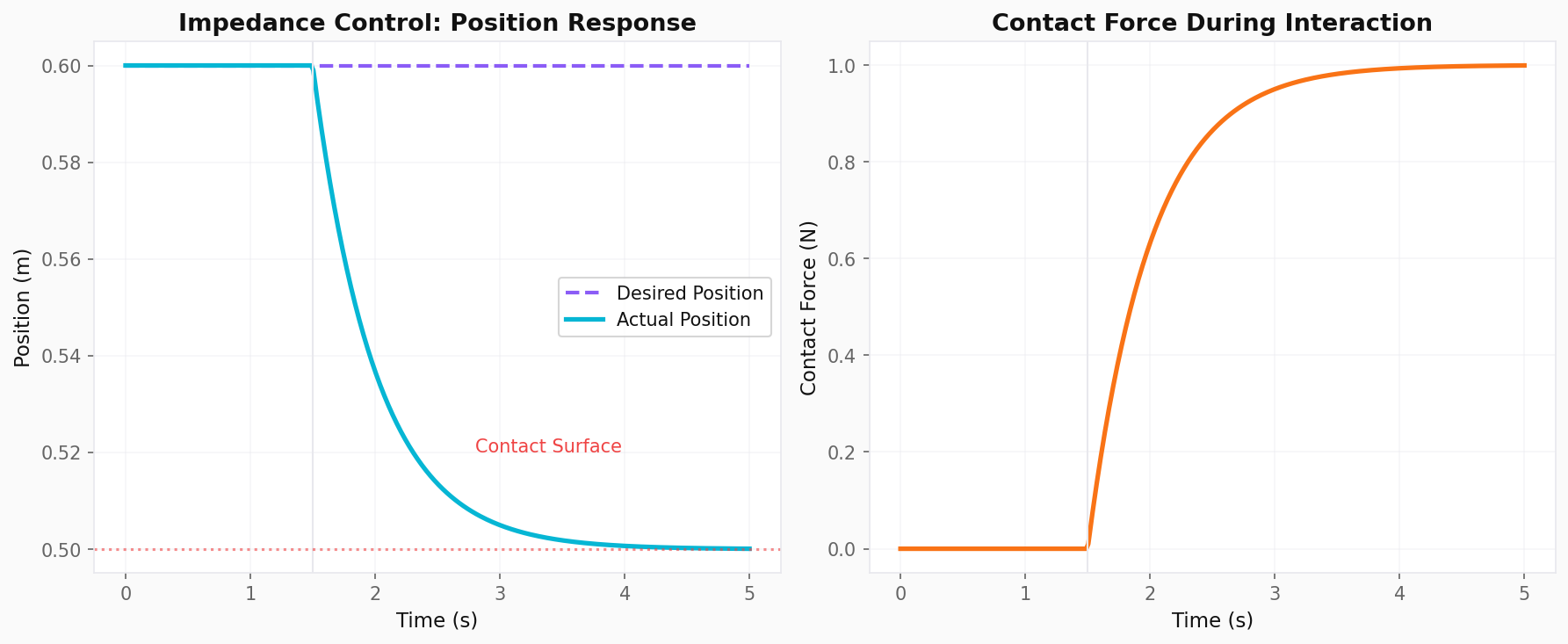
Scenario: A robot arm moves toward a surface at position x = 0.5 m.
- At
t = 1.5s, the end-effector makes contact - The position controller keeps commanding
x = 0.6m - The robot can’t reach 0.6 m — the surface blocks it
- Position error grows → controller increases force
- Result: The robot pushes harder and harder until something breaks
This is not a bug in the controller. It’s a fundamental mismatch between the control objective (position) and the physical reality (force-limited contact).
Force Control: Direct Force Regulation
The simplest solution: control force instead of position.
Direct Force Control Law
τ = Kf · (F_desired - F_measured)
Where Kf is the force control gain. But this has a critical problem:
In free space, force is always zero. If F_desired = 10N and the robot isn’t touching anything, the controller will accelerate indefinitely trying to generate 10N of contact force.
Better: Force Control with Inner Position Loop
import numpy as np

class ForceController:
    """
    Hybrid force/position controller with inner position loop
    """

    def __init__(self, Kp_pos, Kd_pos, Kf, force_axis):
        """
        Args:
            Kp_pos: Position PD gains
            Kd_pos: Velocity damping gains
            Kf: Force control gain
            force_axis: Direction of force control (unit vector)
        """
        self.Kp_pos = np.array(Kp_pos)
        self.Kd_pos = np.array(Kd_pos)
        self.Kf = Kf
        self.force_axis = np.array(force_axis)

        # Integral term for force (reduces steady-state error)
        self.force_integral = 0.0
        self.Ki_f = 0.5

    def control(self, x, dx, F_measured, x_desired, F_desired, dt):
        """
        Compute control command

        Args:
            x: Current position [3]
            dx: Current velocity [3]
            F_measured: Measured contact force (scalar, along force_axis)
            x_desired: Desired position [3]
            F_desired: Desired contact force (scalar)
            dt: Time step

        Returns:
            Desired end-effector wrench [6] (force + torque)
        """
        # Position error
        x_err = x_desired - x
        dx_err = -dx

        # Force error
        F_err = F_desired - F_measured
        self.force_integral += F_err * dt
        self.force_integral = np.clip(self.force_integral, -10.0, 10.0)  # Anti-windup

        # Decompose position error into constrained and free directions
        # Constrained direction (force-controlled): project out force_axis
        pos_free = x_err - np.dot(x_err, self.force_axis) * self.force_axis
        vel_free = dx_err - np.dot(dx_err, self.force_axis) * self.force_axis

        # Position control in free directions
        F_pos = self.Kp_pos * pos_free + self.Kd_pos * vel_free

        # Force control in constrained direction
        F_force = (self.Kf * F_err + self.Ki_f * self.force_integral) * self.force_axis

        # Total force command
        F_cmd = F_pos + F_force

        return F_cmd

# Example: Polishing a surface
controller = ForceController(
    Kp_pos=[100.0, 100.0, 100.0],
    Kd_pos=[20.0, 20.0, 20.0],
    Kf=2.0,
    force_axis=[0, 0, 1]  # Control force along Z (normal to surface)
)

# Simulate contact
x = np.array([0.5, 0.3, 0.5])      # Current position
dx = np.array([0.0, 0.0, -0.1])    # Moving toward surface
F_measured = 5.0                    # Already in contact with 5N
x_desired = np.array([0.5, 0.3, 0.5])  # Stay at this XY position
F_desired = 10.0                    # Want 10N contact force

F_cmd = controller.control(x, dx, F_measured, x_desired, F_desired, dt=0.001)
print(f"Force command: {F_cmd}")
print(f"Expected: small XY correction + increased Z push")
Impedance Control: The Gold Standard
Force control regulates force. Impedance control regulates the relationship between force and position. It makes the robot behave like a physical system with programmable mass, spring, and damper properties.
Mechanical Impedance Analogy
Imagine pushing on a robot. With impedance control, it feels like pushing on a virtual mass-spring-damper:
F = M·(ẍ_desired - ẍ) + B·(ẋ_desired - ẋ) + K·(x_desired - x)
Where:
M: Virtual mass (inertia)B: Virtual damping (energy dissipation)K: Virtual stiffness (spring constant)
Key insight: The robot doesn’t track position or force directly. It tracks a dynamic relationship between them.
Impedance Control Implementation
class ImpedanceController:
    """
    Cartesian impedance controller for robot end-effector
    """

    def __init__(self, M_virtual, B_virtual, K_virtual, null_space_gains=None):
        """
        Args:
            M_virtual: Virtual mass matrix [3x3] or scalar
            B_virtual: Virtual damping matrix [3x3] or scalar
            K_virtual: Virtual stiffness matrix [3x3] or scalar
            null_space_gains: Optional joint-space damping for redundancy
        """
        self.M = np.atleast_1d(M_virtual)
        self.B = np.atleast_1d(B_virtual)
        self.K = np.atleast_1d(K_virtual)

        # Ensure matrices
        if self.M.ndim == 1:
            self.M = np.diag(self.M)
        if self.B.ndim == 1:
            self.B = np.diag(self.B)
        if self.K.ndim == 1:
            self.K = np.diag(self.K)

    def compute_desired_force(self, x, dx, x_desired, dx_desired, ddx_desired):
        """
        Compute desired end-effector force from impedance law

        F = M·(ẍ_d - ẍ) + B·(ẋ_d - ẋ) + K·(x_d - x)
        """
        pos_err = x_desired - x
        vel_err = dx_desired - dx
        accel_err = ddx_desired - np.zeros_like(x)  # We don't measure acceleration directly

        F = (self.M @ accel_err + self.B @ vel_err + self.K @ pos_err)

        return F

    def compute_joint_torques(self, x, dx, x_desired, dx_desired, ddx_desired,
                             jacobian, dq):
        """
        Convert Cartesian impedance force to joint torques

        τ = Jᵀ · F_impedance + (I - Jᵀ·J⁺ᵀ)·τ_null
        """
        # Cartesian impedance force
        F = self.compute_desired_force(x, dx, x_desired, dx_desired, ddx_desired)

        # Primary task: impedance
        tau_task = jacobian.T @ F

        # Null-space damping (optional, for stability)
        if hasattr(self, 'null_space_gains'):
            J_pinv = np.linalg.pinv(jacobian)
            P = np.eye(len(dq)) - jacobian.T @ J_pinv.T
            tau_null = -self.null_space_gains * dq
            tau_task += P @ tau_null

        return tau_task

# Example: Soft interaction controller
soft_controller = ImpedanceController(
    M_virtual=[5.0, 5.0, 5.0],      # Low virtual mass
    B_virtual=[50.0, 50.0, 50.0],   # Moderate damping
    K_virtual=[100.0, 100.0, 100.0] # Low stiffness (compliant)
)

# Example: Stiff precision controller
stiff_controller = ImpedanceController(
    M_virtual=[20.0, 20.0, 20.0],
    B_virtual=[200.0, 200.0, 200.0],
    K_virtual=[2000.0, 2000.0, 2000.0]  # High stiffness (precise)
)
Hybrid Position/Force Control
Many tasks require position control in some directions and force control in others:
| Task | Position-Controlled | Force-Controlled |
|---|---|---|
| Writing on paper | Pen tip XY motion | Pen pressure (Z) |
| Inserting a peg | Peg alignment (XY) | Insertion force (Z) |
| Polishing a surface | Tool path (XY) | Normal force (Z) |
| Walking | Foot placement (XY) | Ground reaction (Z) |
Selection Matrix Approach
class HybridController:
    """
    Hybrid position/force controller using selection matrices
    """

    def __init__(self, S, Kp, Kd, Kf, Ki_f):
        """
        Args:
            S: Selection matrix (1 for force-controlled, 0 for position)
            Kp, Kd: Position control gains
            Kf, Ki_f: Force control gains
        """
        self.S = np.diag(S)  # Force selection
        self.I_S = np.eye(len(S)) - self.S  # Position selection

        self.Kp = np.diag(Kp)
        self.Kd = np.diag(Kd)
        self.Kf = Kf
        self.Ki_f = Ki_f

        self.force_integral = np.zeros(len(S))

    def control(self, x, dx, F, x_des, F_des, dt):
        """
        Compute hybrid control command
        """
        # Position-controlled subspace
        x_err = x_des - x
        dx_err = -dx
        F_pos = self.I_S @ (self.Kp @ x_err + self.Kd @ dx_err)

        # Force-controlled subspace
        F_err = F_des - F
        self.force_integral += F_err * dt
        self.force_integral = np.clip(self.force_integral, -5, 5)
        F_force = self.S @ (self.Kf * F_err + self.Ki_f * self.force_integral)

        return F_pos + F_force

# Example: Polishing (XY position, Z force)
S = [0, 0, 1]  # Z is force-controlled
hybrid = HybridController(
    S=S,
    Kp=[200, 200, 0],
    Kd=[40, 40, 0],
    Kf=3.0,
    Ki_f=1.0
)

x = np.array([0.5, 0.3, 0.51])
dx = np.array([0.1, 0.05, 0.0])
F = np.array([0, 0, 8.0])
x_des = np.array([0.5, 0.3, 0.5])
F_des = np.array([0, 0, 10.0])

F_cmd = hybrid.control(x, dx, F, x_des, F_des, dt=0.001)
print(f"Hybrid command: {F_cmd}")
print(f"XY: position control, Z: force control")
Admittance Control: The Dual of Impedance
Impedance control: measure position → compute force → command torque Admittance control: measure force → compute position → command position
Admittance control is preferred when:
- The robot has a fast, stiff inner position loop
- Force sensors are noisy (position filtering smooths the response)
- You want to trade off force bandwidth for position accuracy
class AdmittanceController:
    """
    Admittance controller: force input → position output
    """

    def __init__(self, M, B, K, dt):
        self.M = M
        self.B = B
        self.K = K
        self.dt = dt

        # Virtual state
        self.x_virtual = np.zeros(3)
        self.dx_virtual = np.zeros(3)

    def update(self, F_ext, x_desired):
        """
        Update virtual position based on external force

        M·ẍ_v + B·ẋ_v + K·(x_v - x_desired) = F_ext
        """
        # Compute virtual acceleration
        pos_err = self.x_virtual - x_desired
        ddx = (F_ext - self.B * self.dx_virtual - self.K * pos_err) / self.M

        # Integrate virtual state
        self.dx_virtual += ddx * self.dt
        self.x_virtual += self.dx_virtual * self.dt

        return self.x_virtual

# Example: Human-robot collaboration
admittance = AdmittanceController(M=10.0, B=100.0, K=50.0, dt=0.001)

# Human pushes robot with 20N
F_human = np.array([20.0, 0, 0])
x_desired = np.array([0.5, 0.3, 0.4])

# Robot complies and moves
x_compliant = admittance.update(F_human, x_desired)
print(f"Compliant position: {x_compliant}")
print(f"Displacement: {x_compliant - x_desired}")
Choosing the Right Interaction Strategy
| Controller | Best For | Avoid When |
|---|---|---|
| Position control | Free-space motion, precision tasks | Contact tasks, uncertain environments |
| Force control | Grinding, polishing, insertion | Free-space motion, fast trajectories |
| Impedance control | Human-robot interaction, assembly | Very stiff contact (instability risk) |
| Admittance control | Industrial robots with stiff loops | Low-bandwidth force sensing |
| Hybrid control | Tasks with natural position/force decomposition | Complex contact geometries |
Key Takeaways
- Position control fails at contact because it cannot regulate contact forces
- Force control directly regulates contact forces but needs careful handling in free space
- Impedance control shapes the robot’s dynamic behavior like a programmable mass-spring-damper
- Hybrid control assigns different directions to position and force control based on task geometry
- Admittance control is the dual of impedance and works well with stiff industrial position controllers
- Stability is the primary challenge: contact introduces nonlinearity that can cause oscillation
Next Steps
Week 5 concludes tomorrow with a comprehensive summary. We’ll review all dynamics concepts, connect them to control strategies, and preview Week 6’s exploration of robot perception and sensing.
Practice Exercise: Implement a complete peg-in-hole insertion simulation using hybrid position/force control. The peg must align in XY (position control) while maintaining 5N insertion force in Z. Add position uncertainty (±2mm) and show that force control in Z prevents jamming while position control in XY achieves alignment.
Disclaimer
For educational purposes only. This article is part of a structured learning curriculum and does not constitute professional engineering advice.